Table of contents:
- What Happens When You Delete an Instagram Account
- How to Export Your Instagram Data Before Deleting
- How to Permanently Delete Your Instagram Account
- Understanding the 30-Day Grace Period
- Why Instagram May Take Up to 90 Days to Delete Data
- Can You Reuse Your Username After Deletion?
- Why Instagram Cannot Delete an Account for You
- Common Reasons People Choose to Delete Instagram
- Final Considerations Before Deleting
- Conclusion
HowToForYou.com – Instagram remains one of the world’s most influential social platforms, but not every user wants to stay indefinitely. Whether concerns involve privacy, digital wellbeing, or a desire to reduce screen time, many people eventually look for a permanent exit.
If you are considering leaving the platform for good, it is important to understand exactly how the deletion process works, what data is removed, and what cannot be recovered afterward. This guide explains how to permanently delete your Instagram account, what happens behind the scenes, and how to prepare before taking the final step.
What Happens When You Delete an Instagram Account
Deleting an Instagram account is not the same as logging out or uninstalling the app. Once the deletion process is completed:
For You :
- Your profile disappears from public view
- Photos, videos, stories, and reels are erased
- Comments, likes, and followers are permanently removed
- You lose access to all stored account data
After deletion is finalized, Instagram does not offer a way to restore the account or retrieve content.
If your goal is only a temporary break, Instagram also offers account deactivation, which hides your profile without deleting your data. Permanent deletion should be chosen only if you are certain you will not return.
How to Export Your Instagram Data Before Deleting
Before requesting deletion, Instagram strongly recommends downloading your personal information. Once the account is removed, the data export tool becomes inaccessible.
For You :
To export your information:
- Log into your Instagram account
- Open Settings
- Go to Accounts Center
- Select Your information and permissions
- Choose Download your information
Instagram will prepare a downloadable file containing photos, posts, messages, and account history. Processing time varies and may take several hours or days depending on account size.
Saving this data is essential if you want a record of your content after leaving the platform.
For You :

How to Permanently Delete Your Instagram Account
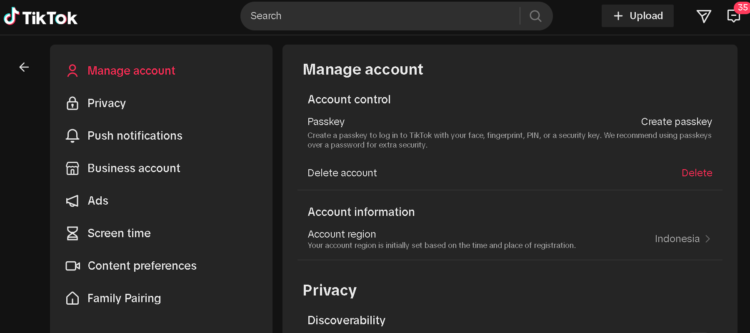
Instagram now manages deletion through Meta’s Accounts Center. You can complete the process using either a phone or a computer.
Step-by-Step Instructions
- Log into your Instagram account
- Click the More menu (hamburger icon) in the lower-left corner
- Select Settings
- Open Accounts Center
- Choose Personal details
- Tap Account ownership and control
- Select Deactivation or deletion
- Choose the account you want to remove
- Select Delete account
- Click Continue and confirm your password
Once confirmed, Instagram records your deletion request and begins the countdown.
Understanding the 30-Day Grace Period
After submitting a deletion request, Instagram does not immediately erase your account.
For You :

Instead, the platform provides a 30-day grace period, during which:
- Your profile is hidden from other users
- Your content is no longer publicly accessible
- You can still cancel the deletion by logging back in
If you sign in during this window, the deletion request is automatically canceled and your account is restored.
The exact number of days may vary slightly depending on your region, but the 30-day standard applies in most countries.
For You :

Why Instagram May Take Up to 90 Days to Delete Data
Even after the 30-day period ends, full deletion may take longer.
Instagram states that it can require up to 90 days to completely remove all associated data from its systems. During this time:
- Backup copies may still exist
- Data may be retained for legal or security purposes
- Information may be preserved to investigate policy violations
These backups are not visible to users and are not accessible to the public. They exist solely for recovery, compliance, and safety reasons.
For You :

Can You Reuse Your Username After Deletion?
In many cases, yes.
Once an account is permanently deleted, the username may become available again. You can:
- Register a new account using the same username
- Add the username to another Instagram account
However, availability is not guaranteed. If another user claims the username before you return, it cannot be recovered.
For You :
Accounts removed for violations of Instagram’s Community Standards may also lose the ability to reuse the same username.
Why Instagram Cannot Delete an Account for You
Instagram does not allow customer support to delete accounts on a user’s behalf. This policy exists for security reasons.
To request deletion, you must be able to:
For You :

- Log into the account
- Verify ownership through your password or linked credentials
If you cannot access your account due to a forgotten password or email, Instagram requires you to complete account recovery steps before deletion can proceed.
This safeguard helps prevent unauthorized removal of accounts.
Common Reasons People Choose to Delete Instagram
While motivations differ, some of the most common reasons include:
- Privacy and data protection concerns
- Mental health and screen-time reduction
- Transitioning away from social media entirely
- Professional brand changes
- Avoiding targeted advertising
With increased awareness of digital wellbeing, permanent account deletion has become more common among long-term users.
Final Considerations Before Deleting
Before confirming your request, review the following checklist:
- Download your Instagram data
- Save photos and videos locally
- Notify contacts if needed
- Remove Instagram login access from third-party apps
- Confirm you are not using Instagram to log into other services
Once the deletion process passes the grace period, recovery is not possible.
Conclusion
Knowing how to permanently delete your Instagram account ensures that you stay in control of your digital footprint. The process itself is straightforward, but the consequences are permanent.
By exporting your data, understanding the 30-day cancellation window, and recognizing how long deletion truly takes, you can make an informed decision rather than a rushed one.
For users ready to move on from Instagram entirely, following the correct steps ensures a clean and secure exit from the platform.